
Trusted by 2,500+ Teams Worldwide
Turn Every Minute Into Measurable Productivity
Time Tracker captures work activity with automated screenshots, intelligent productivity scoring, and real-time insights—helping teams work smarter across Windows and Mac.
- No credit card required
- 3-minute setup
- SOC 2 compliant

Automatic Screenshots
Capture screens every 3 minutes for complete visibility

Productivity Scoring
AI-powered classification of productive vs idle time

Real-time Analytics
Live dashboards with actionable team insights
+23% Productivity
Real-time Insights
Stop Guessing Where Your Team’s Time Goes

The Hidden Costs
Without proper tracking, you’re flying blind:

No visibility into remote productivity
Teams working from home become black boxes – you hope they’re productive but can’t verify
Manual timesheets waste hours
Employees spend 30+ minutes daily filling timesheets – often inaccurately from memory
Can’t identify productivity bottlenecks
Without data, you can’t spot which tools or processes are slowing your team down
Difficult to justify project costs
Can’t accurately bill clients or forecast budgets without real time data

The TimeTracker Advantage
Automatic tracking that captures every moment:

See everything in real-time
Live dashboards show exactly who’s working on what, when, and for how long

Zero manual entry required
Automatic tracking means 100% accurate data with no employee time wasted

AI-powered productivity insights
Instantly know which apps help or hurt productivity with smart categorization

Accurate billing & budgeting
Every billable minute captured automatically for precise client invoicing
Transform Your Workforce Management
Join 2,500+ teams who’ve increased productivity by an average of 23% with TimeTracker

Save 4+ hours per week

Boost productivity 23%

Reduce costs 30%

Powerful Features
Everything You Need for Complete Workforce Visibility
From automatic time tracking to advanced analytics, TimeTracker provides the tools you need to optimize productivity and streamline operations.

01
Automatic Time Tracking
Effortlessly capture every minute of work without manual input. Our intelligent tracking runs silently in the background.
- Start/stop tracking automatically
- Detect idle time intelligently
- Track across multiple devices

02
Periodic Screenshots
Ensure accountability with visual activity checks and flexible screenshot intervals—privacy always respected.
- Configurable capture intervals
- Optional blur for sensitive content
- Secure AWS S3 storage

03
Productivity Intelligence
AI-powered categorization automatically classifies applications and websites as productive, neutral, or distracting.
- Pre-built rules for 100+ apps
- Custom productivity rules
- Team-specific configurations

04
Team Management
Organize users into teams with custom rules and permissions. Scale monitoring across departments effortlessly.
- Role-based access control
- Department hierarchies
- Bulk user management

05
Advanced Analytics
Comprehensive reports and real-time dashboards provide actionable insights into productivity patterns and trends.
- Real-time activity dashboards
- Customizable report templates
- Export to CSV/PDF

06
Privacy Controls
Balance monitoring with employee privacy. Flexible controls ensure compliance and maintain trust.
- Screenshot blur options
- Stealth mode settings
- GDPR compliance ready

Live Dashboard
See TimeTracker in Action
Experience the intuitive interface that makes workforce insights effortless. Every feature is designed for maximum clarity and minimum complexity.

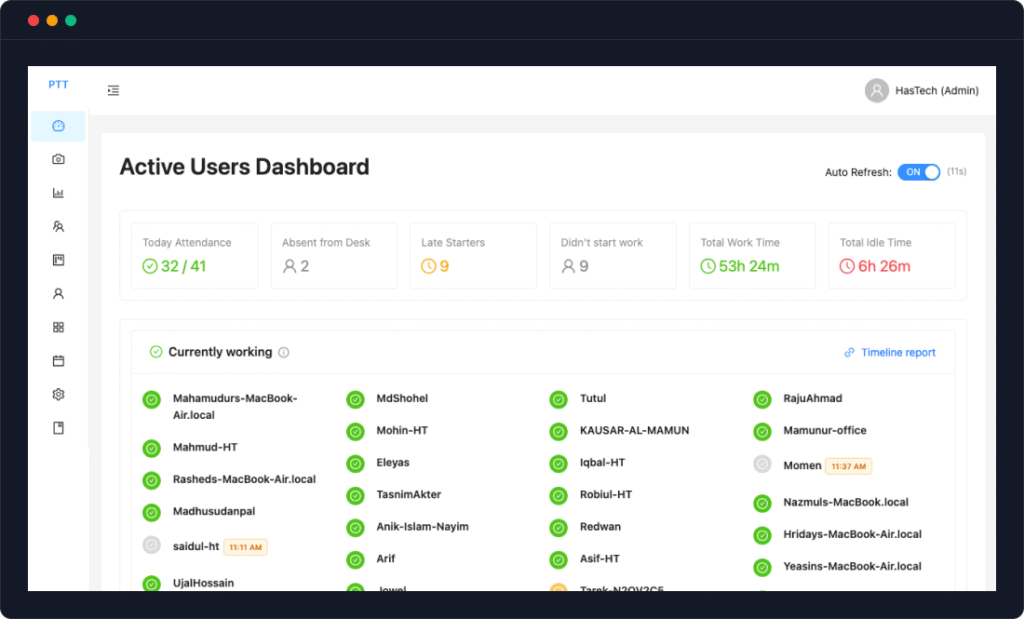
Active Users Widget
See who’s currently working, idle, or on break in real-time
Productivity Score
AI-powered analysis of productive vs unproductive time
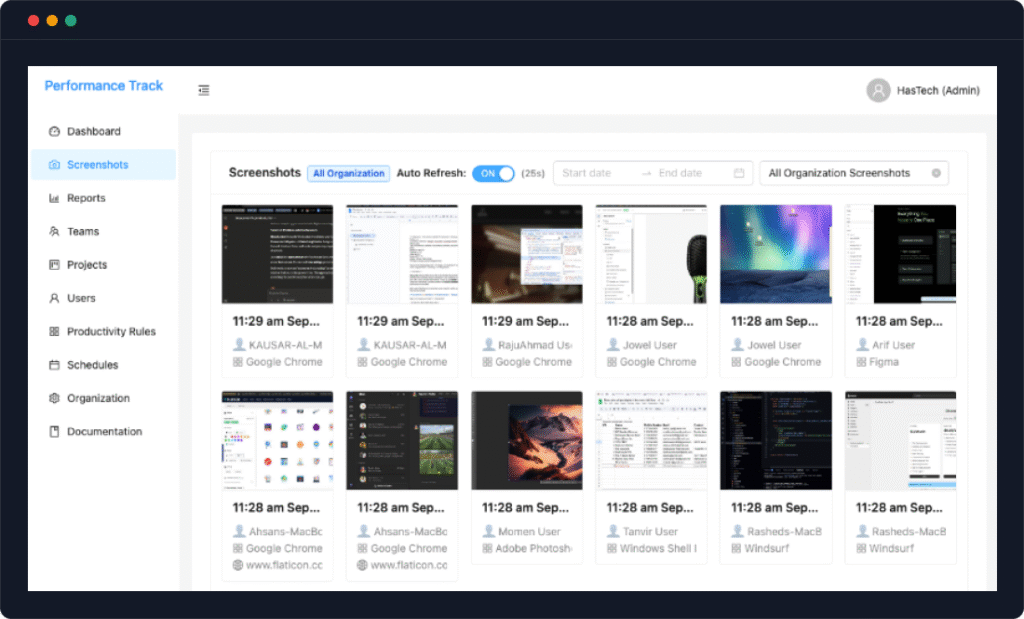
Screenshot Timeline
Visual timeline of captured screenshots with activity context
Real-time Updates
Analytics Reports
Active Users Widget
See who’s currently working, idle, or on break in real-time
Productivity Score
AI-powered analysis of productive vs unproductive time
Screenshot Timeline
Visual timeline of captured screenshots with activity context
Real-time Updates 2
Analytics Reports
Active Users Widget
See who’s currently working, idle, or on break in real-time
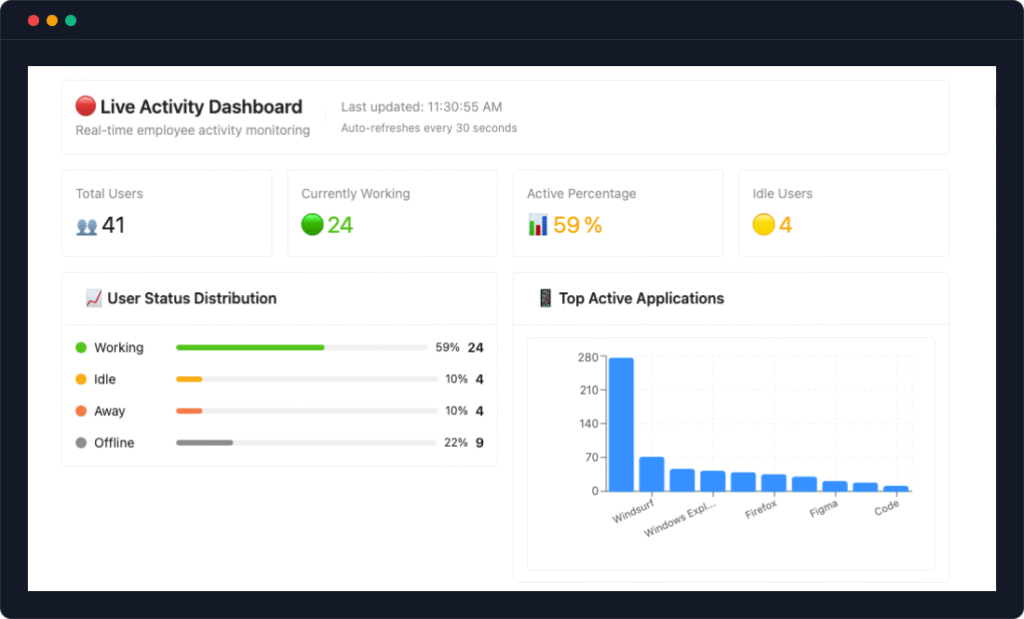
Productivity Score
AI-powered analysis of productive vs unproductive time
Screenshot Timeline
Visual timeline of captured screenshots with activity context
Real-time Updates 3
Analytics Reports
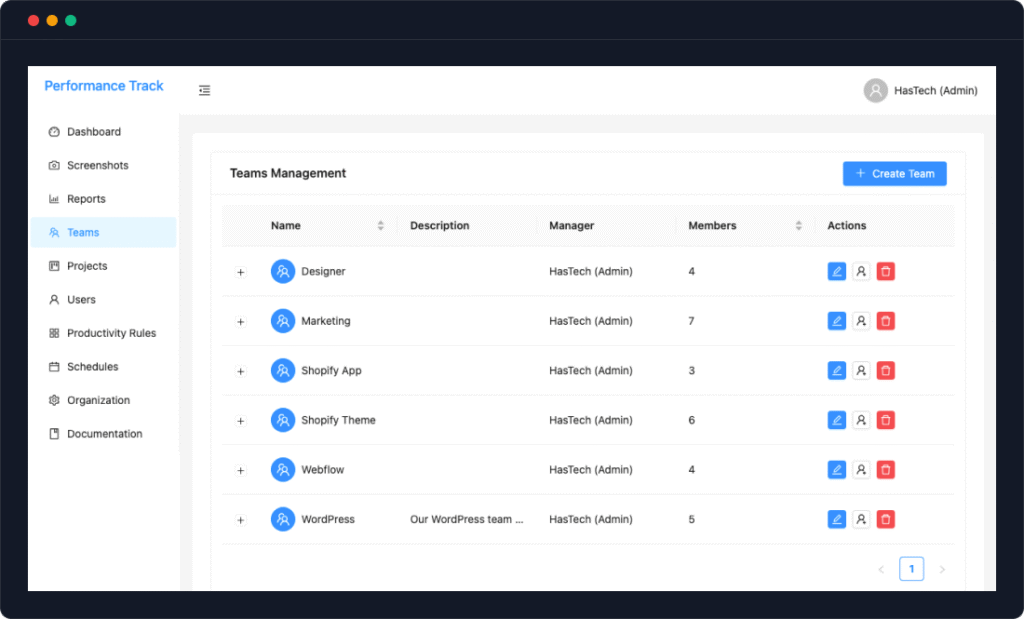
Active Users Widget
See who’s currently working, idle, or on break in real-time
Productivity Score
AI-powered analysis of productive vs unproductive time
Screenshot Timeline
Visual timeline of captured screenshots with activity context
Real-time Updates 4
Analytics Reports

Real-Time Visibility
Monitor active users, current tasks, & productivity scores as they happen

Smart Screenshots
Automatic captures with context, blur options, and intelligent categorization

Detailed Analytics
Comprehensive reports with actionable insights and trend analysis

Instant Actions
One-click exports, quick filters, and immediate access to any metric
Ready to See Your Team’s Full Potential?
Get a personalized demo and discover how TimeTracker can transform your workforce management.

Quick Setup
From Sign-Up to Insights in Under 5 Minutes
Getting started with TimeTracker is incredibly simple. No complex configurations, no lengthy onboarding—just follow these four easy steps.

1
Create Your Organization
Sign up and receive your unique organization identifier. Configure your AWS S3 storage and set preferences.

1 minute

2
Install on Devices
Download TimeTracker for Windows or Mac. One-click installation with automatic organization linking.
30 seconds

3
Set Productivity Rules
Define which apps are productive or distracting. Create team-specific rules or use our pre-built templates.
2 minute

4
Monitor & Optimize
Sign up and receive your unique organization identifier. Configure your AWS S3 storage and set preferences.
Instant
Ready to Get Started?
Join thousands of teams already using TimeTracker to boost productivity and gain complete visibility into their workforce.
- No credit card required
- 3-minute setup
- SOC 2 compliant

Industry Solutions
Built for Modern Work Environments
Whether you’re managing remote teams, running an agency, or scaling a startup, TimeTracker adapts to your unique needs.

Most Popular
Remote Teams
Perfect visibility for distributed teams. Know exactly when your remote employees are working and what they’re working on.
- Track across multiple time zones
- Ensure work-life balance
- Build trust with transparency
- Identify collaboration patterns
32%
More Productive
2.5h
Saved Daily

Best ROI
Digital Agencies
Accurate client billing and project profitability. Track time across multiple clients and projects effortlessly.
- Accurate client billing
- Project profitability insights
- Resource allocation optimization
- Deadline management
98%
Billing Accuracy
45%
More Billable

Fast Growing
Growing Startups
Scale your team efficiently. Understand productivity patterns and optimize workflows as you grow.
- Identify high performers
- Optimize team structure
- Data-driven hiring decisions
- Build productive culture
3x
Faster Scaling
28%
Cost Reduction

Most Popular
Global Remote Teams
Perfect visibility for distributed teams. Know exactly when your remote employees are working and what they’re working on.
- Track across multiple time zones
- Ensure work-life balance
- Build trust with transparency
- Identify collaboration patterns
32%
More Productive
2.5h
Saved Daily

Flexible Work
Hybrid Teams
Balance office and remote productivity. Get consistent insights regardless of where your team works.
- Office vs home productivity comparison
- Flexible work policy optimization
- Meeting effectiveness tracking
- Collaboration pattern insights
27%
Better Balance
90%
Team Satisfaction

Contractor Ready
Freelance Teams
Manage distributed freelancers and contractors. Ensure deliverables are met with transparent tracking.
- Contractor hour verification
- Project-based tracking
- Multi-client management
- Deliverable timeline tracking
100%
Hour Accuracy
35%
Faster Delivery

Best ROI
Digital Agencies
Accurate client billing and project profitability. Track time across multiple clients and projects effortlessly.
- Accurate client billing
- Project profitability insights
- Resource allocation optimization
- Deadline management
98%
Billing Accuracy
45%
More Billable

Campaign Focused
Marketing Agencies
Track campaign execution and creative productivity. Balance client work with business development.
- Campaign time tracking
- Creative vs admin time
- Client profitability analysis
- Pitch preparation tracking
40%
More Billable Time
2x
Campaign Output

Revenue Growth
Consulting Firms
Maximize consultant utilization and billable hours. Provide transparent reporting to clients.
- Utilization rate tracking
- Client-ready reports
- Multi-project management
- Profitability analysis
87%
Utilization Rate
40%
Revenue Increase

Bootstrap Friendly
Early-Stage Startups
Build productive habits from day one. Understand where founder time goes and optimize accordingly.
- Founder time allocation
- Priority vs actual time spent
- Distraction identification
- Focus time optimization
45%
More Focus Time
3x
Task Completion

Scale Ready
Growth-Stage Startups
Scale your team efficiently. Understand productivity patterns and optimize workflows as you grow.
- Identify high performers
- Optimize team structure
- Data-driven hiring decisions
- Build a productive culture
3x
Faster Scaling
28%
Cost Reduction

Dev Focused
Tech Startups
Track development sprints and coding productivity. Balance feature development with technical debt.
- Sprint velocity tracking
- Code vs meeting time ratio
- Focus time optimization
- Remote dev management
55%
More Code Time
2x
Sprint Velocity

Enterprise Scale
Fortune 500
Enterprise-grade monitoring with advanced security. Manage thousands of employees across global offices.
- Multi-region deployment
- Department hierarchies
- Compliance reporting
- Advanced security controls
10k+
Users Supported
99.9%
Uptime SLA

Compliance Ready
Financial Services
Meet strict regulatory requirements while monitoring productivity. Bank-level security with audit trails.
- Regulatory compliance
- Audit trail maintenance
- Data residency controls
- Risk management tools
98%
Compliance Rate
45%
SOC 2 Certified

HIPAA Ready
Healthcare Organizations
HIPAA-compliant monitoring for healthcare staff. Track administrative efficiency while protecting patient privacy.
- HIPAA compliance
- PHI protection
- Shift management insights
- Administrative efficiency
35%
Admin Time Saved
100%
Privacy Protected
See How TimeTracker Works for Your Industry
Get a personalized demo tailored to your specific use case and see the ROI for yourself.
Limited Early Access
Be Among the First to Transform Your Team’s Productivity
TimeTracker is launching soon. Join our exclusive early access program and get lifetime benefits that won’t be available after launch.

Beta Tester
“The beta version already saves me 2 hours daily. The screenshot feature with productivity scoring is genius – I can finally see where my time actually goes.”
AK
Alex Kumar
Freelance Developer
Beta Tester
“Even in beta, this is already better than expensive alternatives. The setup was incredibly simple and the productivity insights are eye-opening.”
MR
Maria Rodriguez
Startup Founder
Beta Tester
“The team is incredibly responsive to feedback. Features I suggested are already being implemented. It’s rare to have this level of influence on a product.”
JT
James Thompson
Agency Owner
Early Access Exclusive Benefits

50% Lifetime Discount
Lock in our lowest price forever as an early supporter

Priority Support
Direct access to our founding team for instant help

Shape the Product
Your feedback drives our roadmap and features

Enterprise Security
Bank-Level Security for Your Peace of Mind
Your data security is our top priority. TimeTracker employs industry-leading security measures to protect your sensitive information.

End-to-End Encryption
All data is encrypted using AES-256 encryption both in transit and at rest, ensuring complete data protection.

Your Own AWS Storage
Screenshots and data are stored in your own AWS S3 bucket, giving you complete control and ownership.

Role-Based Access
Granular permission controls ensure team members only see data relevant to their role and responsibilities.

Privacy Controls
Screenshot blurring, stealth mode options, and customizable privacy settings protect sensitive information.

Audit Logs
Complete audit trail of all system access and changes, ensuring accountability and compliance requirements.

Secure Infrastructure
Hosted on secure, redundant infrastructure with 99.9% uptime guarantee and automatic backups.
Compliance & Certifications

SOC 2 Ready

GDPR Compliant

ISO 27001 Standards

256-bit Encryption
Your Data, Your Control
We believe in complete transparency and giving you full control over your data. Here’s our commitment to your privacy:

You own all your data – we never sell or share it
Delete your data anytime with complete removal
Export all data in standard formats whenever needed
No third-party access without your explicit consent
🛡️
Security Questions? We’re Here to Help
Our security team is available to answer any questions about our security practices and help you meet your compliance requirements.

FAQs
Frequently Asked Questions
Everything you need to know about TimeTracker. Can’t find what you’re looking for? Our support team is here to help.
How does TimeTracker ensure employee privacy?
We take privacy seriously and provide multiple layers of protection:
- You maintain complete ownership and control of your data
- Customizable privacy modes and stealth settings
- Employees can pause tracking during breaks
- Clear notifications when tracking is active
- All data is encrypted and stored securely in your own AWS bucket
Can I use my own cloud storage?
Yes! TimeTracker is designed to work with your own AWS S3 bucket. This means:
- You maintain complete ownership and control of your data
- Screenshots and data never pass through our servers
- You can apply your own retention policies
- Integration with your existing backup systems
- Compliance with your organization’s data residency requirements
Does TimeTracker slow down computers?
No, TimeTracker is designed to be lightweight and efficient:
- Uses less than 1% CPU on average
- Minimal memory footprint (under 50MB)
- Smart screenshot compression to save bandwidth
- Runs quietly in the background without interruptions
- Tested on thousands of devices for optimal performance
How accurate is the productivity scoring?
Our AI-powered productivity scoring achieves 99.9% accuracy through:
- Pre-built rules for 100+ common applications
- Machine learning that adapts to your team’s workflow
- Customizable productivity categories for your industry
- Regular updates to recognize new applications
- Manual override options for edge cases
Can employees see their own data?
Yes, transparency is key to building trust:
- Employees can access their personal dashboards
- View their productivity scores and time tracking
- See the same data managers see about them
- Export their own reports for personal improvement
- Request corrections if any data seems incorrect
What happens to screenshots after they’re taken?
Screenshots are handled with maximum security:
- Encrypted immediately upon capture
- Uploaded directly to your AWS S3 bucket
- Compressed to save storage space
- Retained according to your policies (customizable)
- Can be automatically deleted after specified periods
- Accessible only to authorized personnel with proper permissions
How long does it take to set up TimeTracker?
The entire setup process takes less than 5 minutes. Simply create your organization account, configure your AWS S3 bucket, and install the desktop application on your devices. The app automatically links to your organization using a unique identifier.
What are the system requirements?
TimeTracker runs on Windows 10/11 and macOS 10.14 or later. It requires minimal resources – just 50MB of disk space and less than 50MB of RAM. An internet connection is needed for data syncing and screenshot uploads.
Do I need technical knowledge to install TimeTracker?
No technical expertise is required. The installation is a simple one-click process. We provide step-by-step guides and video tutorials. If you can install any regular software, you can install TimeTracker.
Can I try TimeTracker before purchasing?
Yes! We offer a 14-day free trial with full features and no credit card required. You can test TimeTracker with your entire team to see how it fits your workflow before making any commitment.
How do I add team members?
Adding team members is simple through the web dashboard. Create user accounts, assign roles (Admin, Manager, or Employee), and send them installation instructions. Users automatically appear in your dashboard once they install the app.
Can I customize TimeTracker for my organization?
Absolutely. You can set custom screenshot intervals, idle time thresholds, productivity rules, and privacy settings. Create team-specific configurations and import/export rule templates to match your workflow.
How does TimeTracker ensure employee privacy?
We take privacy seriously with multiple protection layers:
- Optional screenshot blurring for sensitive content
- Customizable privacy modes and stealth settings
- Employees can pause tracking during breaks
- Clear notifications when tracking is active
- All data is encrypted and stored securely in your own AWS bucket
Can I use my own cloud storage?
Yes! TimeTracker is designed to work with your own AWS S3 bucket. This means:
- You maintain complete ownership and control of your data
- Screenshots and data never pass through our servers
- You can apply your own retention policies
- Integration with your existing backup systems
- Compliance with your organization’s data residency requirements
Is my data encrypted?
All data is encrypted using AES-256 encryption both in transit and at rest. Your AWS credentials are encrypted and stored securely. We follow industry best practices for data security and undergo regular security audits.
Who can access employee data?
Access is controlled through role-based permissions:
- Admins can see all organizational data
- Managers can only see their team’s data
- Employees can view their own data
- All access is logged for audit purposes
Does TimeTracker comply with GDPR?
Yes, TimeTracker is fully GDPR compliant. We provide data portability, the right to deletion, and transparent data processing. Since data is stored in your own AWS bucket, you have complete control over data residency and retention.
Can employees delete their data?
Employees can request data deletion through their managers or admins. Admins can configure automatic data retention policies to delete old screenshots and activity data after a specified period.
How accurate is the productivity scoring?
Our AI-powered productivity scoring achieves 99.9% accuracy through:
- Pre-built rules for 100+ common applications
- Machine learning that adapts to your team’s workflow
- Customizable productivity categories for your industry
- Regular updates to recognize new applications
- Manual override options for edge cases
Can employees see their own data?
Yes, transparency is key to building trust:
- Employees can access their personal dashboards
- View their productivity scores and time tracking
- See the same data managers see about them
- Export their own reports for personal improvement
- Request corrections if any data seems incorrect
How often are screenshots taken?
Screenshot frequency is customizable. The default is every 3 minutes, but you can adjust from 1 to 10 minutes based on your needs. Different intervals can be set for different teams or projects.
Can I track specific applications or websites?
Yes! Our Productivity Rules Engine allows you to:
- Track time spent in specific applications
- Monitor website visits and duration
- Set productivity classifications for each app/site
- Create custom categories for your business
- Use regular expressions for advanced matching
Does TimeTracker work offline?
TimeTracker continues tracking when offline and automatically syncs data when the connection is restored. Screenshots are queued locally and uploaded once internet access is available.
What reports are available?
TimeTracker offers a comprehensive report including:
- Daily/weekly/monthly activity summaries
- Productivity trend analysis
- Team comparison reports
- Project time allocation
- Individual performance reports
- Custom report builder with export options
Limited Time Offer
Start Tracking Smarter Today
Join the early access program and transform how your team works. Get 50% off for life as one of our founding members.
- No credit card required
- 3-minute setup
- SOC 2 compliant